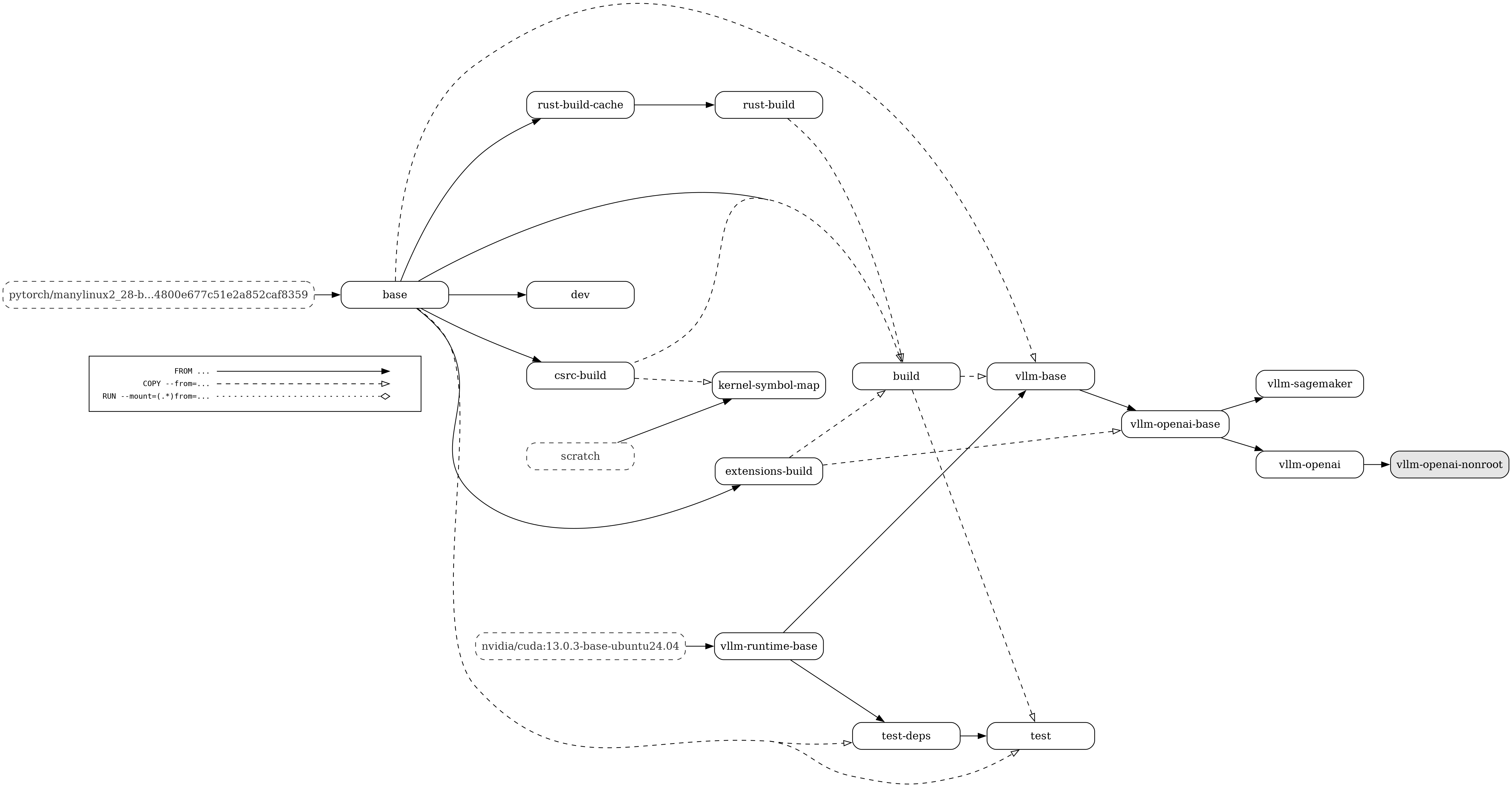
We provide a docker/Dockerfile to construct the image for running an OpenAI compatible server with vLLM.
More information about deploying with Docker can be found here.
Below is a visual representation of the multi-stage Dockerfile. The build graph contains the following nodes:
All build stages
The default build target (highlighted in grey)
External images (with dashed borders)
The edges of the build graph represent:
FROM ... dependencies (with a solid line and a full arrow head)
COPY --from=... dependencies (with a dashed line and an empty arrow head)
RUN --mount=(.\*)from=... dependencies (with a dotted line and an empty diamond arrow head)
The test-deps stage branches from vllm-runtime-base so Git and the test
requirements remain cached independently of per-commit vLLM wheels and source.
The vllm-runtime-base stage explicitly installs the current Ubuntu
ca-certificates package so clients using the system trust store receive
certificate removals when the image is rebuilt. This complements the Python
certifi bundle used by other HTTP clients.
The extensions-build stage can also produce an optional source-built Triton
wheel. vllm-openai-base installs that wheel after its other Python
dependencies so dependency resolution cannot restore an older Triton version.
The AWS EFA images are built separately by docker/Dockerfile.efa on top of a
vllm-openai image built with INSTALL_KV_CONNECTORS=true. It adds a minimal
AWS EFA userspace install (libfabric, aws-ofi-nccl and hwloc), the EFA Mooncake
wheel (x86_64 only), and DeepEP built for NCCL GIN over EFA. Kernel modules and
host limits remain host-managed.
The release pipeline publishes the CUDA 13.0 EFA image to DockerHub as
vllm/vllm-openai:latest-efa and vllm/vllm-openai:v<version>-efa for releases,
and as vllm/vllm-openai:efa-nightly and vllm/vllm-openai:efa-nightly-<commit>
for nightly builds.
The image does not change vLLM's Mooncake protocol default (rdma). To use
EFA, set it per connector:
MooncakeConnector: "mooncake_protocol": "efa" in kv_connector_extra_config.